Here I'm using a program written in C to decode the serial data from a Brymen BM2257 multimeter. To help illustrate the read interval of the program, the meter is being supplied with a 10mHz (millihertz) sine wave, at 4V peak-to-peak, which is slow enough for the meter to show a DC value which continuously cycles between 2V and -2V.
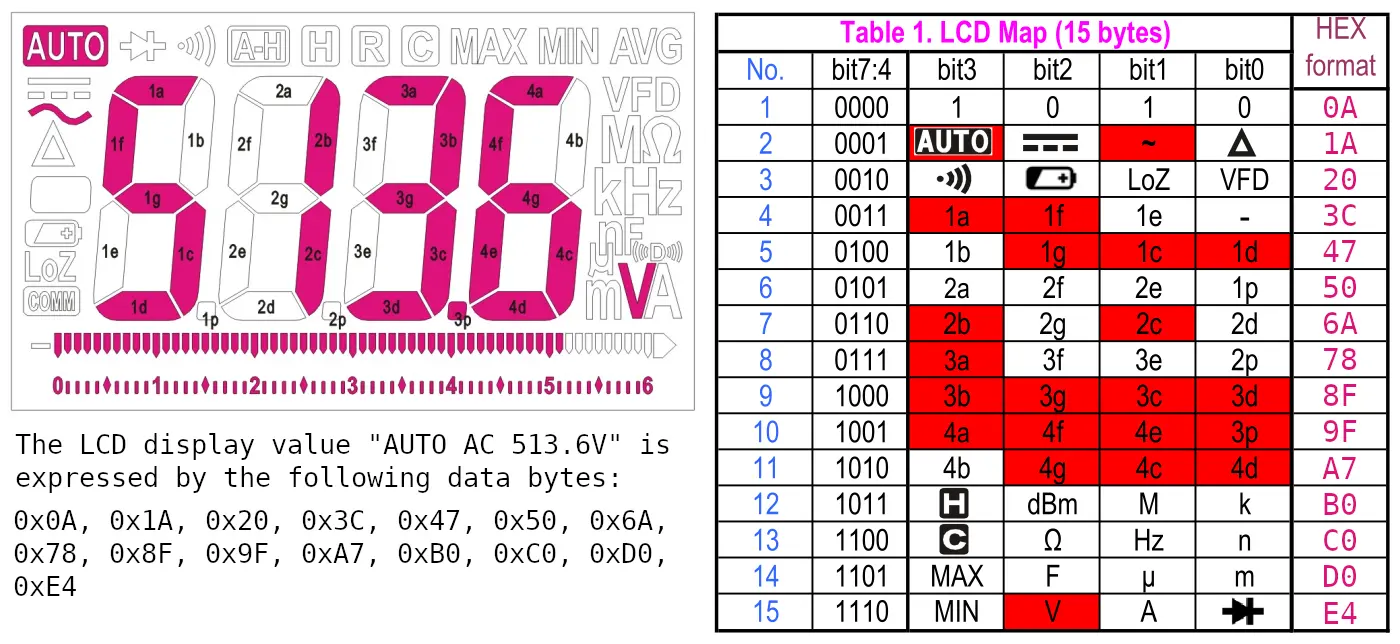
The C program is based on the information presented in the 'Brymen digital multimeter communication protocol' document. Here is a simplified, and corrected, illustration from the document showing how the fifteen bytes of serial data relate to the segments and annunciators on the LCD display.
The code below compiles on Linux and MAC OS, and has a couple of options for specifying a read interval and logfile. The logfile is written as comma-separated-values, so can be imported into any spreadsheet software. This chart shows the 10mHz sine wave, generated in LibreOffice Calc using the data from the log file.

By setting the read interval to zero all readings sent from the meter will be written to the display and logfile, which occur at a rate of five-per-second, matching the refresh rate of the meter's display. A slower read interval, such as one reading every two seconds, can be selected by specifying a read interval of two.
/*
 * File: brymen_serial_comms.c
 *
 * Author: paul reynolds ( paul at v9tronics d0t c0m )
 *
 * Seeing as there's a Brymen datasheet describing the communications protocol
 * for their 6000 count multimeters (and because their data-logging software is
 * windows-only) I thought I'd write this program to convert the serial output
 * from a BM225x or BM25x to a human-readable format.
 *
 * This code could be adapted to work on a microcontroller for all manner of
 * exciting purposes! The Brymen data cable being terminated with a classic DB9
 * connector makes this an easy thing to do with a MAX232!
 */

// standard C headers
#include <stdlib.h>
#include <stdio.h>
#include <string.h>
#include <time.h>

// linux specific headers
#include <fcntl.h>   // Contains file controls like O_RDWR
#include <errno.h>   // Error integer and strerror() function
#include <termios.h> // Contains POSIX terminal control definitions
#include <unistd.h>  // write(), read(), close()


#define SERIAL_DEVICE "/dev/ttyUSB0"         // serial to USB adaptor device name

#define READ_INVERVAL 0                      // 0: 5 reading per sec,  3: 1 reading every 3 secs

#define LOG_FILE_NAME "meter_readings.csv"   // write meter readings here


// annunciators - in 6x4 table
const char * annunciators[6][4] = {
  {"DELTA", "AC",  "DC",    "AUTO"},   // 0  1
  {"VFD",   "LoZ", "LoBAT", "BEEP"},   // 1  2
  {"k",     "M",   "dBm",   "[H]" },   // 2  11
  {"n",     "Hz",  "ohm",   "[C]" },   // 3  12
  {"m",     "u",   "F",     "MAX" },   // 4  13
  {"Diode", "A",   "V",     "MIN" }    // 5  14
};//  0      1      2         3


// 7-segment display values
const int segments[13] = {
    0xEB, 0x0A, 0xAD, 0x8F, 0x4E, 0xC7, 0xE7, 0x8A, 0xEF, 0xCF,  // 0 to 9
    0xE1, 0xE4,                                                  // C and F
    0x04                                                         // -
};


// convert our fifteen bytes to a formatted string
void brymen_data_to_string( unsigned char * data, char * result ){

    strcpy( result, "" ); // assign an empty string

    // match segment display data (bytes 3 to 10) to our segments array
    int digit[4] = { 0,0,0,0 };

    for( int i=3,d=0; i<10; i+=2 ){  // increment by two: 3,3+1, 5,5+1, 7,7+1, 9,9+1

        for( int n=0; n<13; n++ ){   // match the two l.s.nibbles to a segment value

            if( segments[n] == ((data[i] & 0x0E) << 4) + (data[i+1] & 0x0F) ){

                digit[d]=n;  d++;  break;
            }
        }
    }


    // convert the four digits to a float, and...
    float value = (digit[0]*1000) +
                  (digit[1]*100)  +
                  (digit[2]*10)   +

                  // zero if fourth digit is C, F or -
                  (digit[3]>9?0:digit[3]);

    // make negative if negative bit is set
    if( data[3] & 0x01 ){ value*=-1;  }

    // assign decimal point, and format so 4130.000000 becomes...
    unsigned char value_format[12];    strcpy( value_format, "%s%1.0f ");    // 4

    if( data[5] & 0x01 ){ value/=1000; strcpy( value_format, "%s%5.3f "); }  // 4.130
    if( data[7] & 0x01 ){ value/=100;  strcpy( value_format, "%s%4.2f "); }  // 4.13
    if( data[9] & 0x01 ){ value/=10;   strcpy( value_format, "%s%3.1f "); }  // 4.1

    // when fourth digit is C or F, format as temperature...
    if( digit[3] == 10 ){ strcpy( value_format, "%s%3.1f C"); }  // celsius
    if( digit[3] == 11 ){ strcpy( value_format, "%s%3.1f F"); }  // fahrenheit

    // when fourth digit is "-" no thermocouple is connected, so show 0.0
    if( digit[2] == 12 ){ value = 0; }

    // append annunciator row 1 and 2, which relate to row 0 and 1 of our table
    for( int i=1; i<3; i++ ){
        for( int n=0; n<4; n++ ){
            if( data[i] & (1<<n) ){ sprintf( result, "%s%s ", result, annunciators[i-1][n] ); }
        }
    }

    // append value to result with the previously defined formatting
    sprintf( result, value_format, result, value );

    // append annunciator rows 10 to 14, which relate to rows 2 to 5 of our table
    for( int i=11; i<15; i++ ){
        for( int n=0; n<4; n++ ){
            if( data[i] & (1<<n) ){ sprintf( result, "%s%s", result, annunciators[i-9][n] ); }
        }
    }
}


int main(){

  // initialize file descriptor and open USB serial port
  int serial_port = open( SERIAL_DEVICE, O_RDWR );

  struct termios tty;

  time_t seconds;

  struct tm *current;

  int  byte_count    = 0;

  int  this_second   = 0;

  int  seconds_count = 0;

  FILE *csv_file;

  unsigned char read_buffer[15];

  char brymen_text[65];

  char data_string[150];


  // read-in existing settings, and handle any error
  if( tcgetattr(serial_port, &tty) != 0 ){

    printf( "Error %i from tcgetattr: %s\n\n", errno, strerror(errno) );
    printf( "There's probably something up with: %s\n\n", SERIAL_DEVICE );
    return 1;
  }

  // set or clear parameters
  tty.c_cflag &= ~PARENB; // Clear parity bit, disabling parity (most common)
  tty.c_cflag &= ~CSTOPB; // Clear stop field, only one stop bit used in communication (most common)
  tty.c_cflag &= ~CSIZE; // Clear all bits that set the data size
  tty.c_cflag |= CS8; // 8 bits per byte (most common)
  tty.c_cflag &= ~CRTSCTS; // Disable RTS/CTS hardware flow control (most common)
  tty.c_cflag |= CREAD | CLOCAL; // Turn on READ & ignore ctrl lines (CLOCAL = 1)
  tty.c_lflag &= ~ICANON;
  tty.c_lflag &= ~ECHO; // Disable echo
  tty.c_lflag &= ~ECHOE; // Disable erasure
  tty.c_lflag &= ~ECHONL; // Disable new-line echo
  tty.c_lflag &= ~ISIG; // Disable interpretation of INTR, QUIT and SUSP
  tty.c_iflag &= ~(IXON | IXOFF | IXANY); // Turn off s/w flow ctrl
  tty.c_iflag &= ~(IGNBRK|BRKINT|PARMRK|ISTRIP|INLCR|IGNCR|ICRNL); // Disable any special handling of received bytes
  tty.c_oflag &= ~OPOST; // Prevent special interpretation of output bytes (e.g. newline chars)
  tty.c_oflag &= ~ONLCR; // Prevent conversion of newline to carriage return/line feed
  // tty.c_oflag &= ~OXTABS; // Prevent conversion of tabs to spaces (NOT PRESENT ON LINUX)
  // tty.c_oflag &= ~ONOEOT; // Prevent removal of C-d chars (0x004) in output (NOT PRESENT ON LINUX)
  tty.c_cc[VTIME] = 0; // Wait for up to 1s (10 deciseconds), returning as soon as any data is received.
  tty.c_cc[VMIN] = 15; // only return once fifteen bytes have been received

  // set in/out baud rate to be 9600
  cfsetispeed(&tty, B9600);
  cfsetospeed(&tty, B9600);

  // save tty settings, whilst checking for error
  if( tcsetattr(serial_port, TCSANOW, &tty) != 0 ){

    printf( "error %i from tcsetattr: %s\n", errno, strerror(errno) );
    return 1;
  }


  while(1){

    // read in fifteen bytes from the serial port
    if( byte_count == 0 ){

      byte_count = read( serial_port, &read_buffer, 15 );

      // something's gone awry, so print an error message
      if( byte_count < 0 ){

        printf( "error: %s", strerror( errno ) );
        return 1;
      }
    }


    // once we have 15 bytes, and a valid start byte, we're good to go!
    if( byte_count == 15 && read_buffer[0] == 0x0A ){

      byte_count = 0;

      seconds = time( NULL );

      current = localtime( &seconds );

      // increment seconds_count every second
      if( this_second != current->tm_sec ){

        this_second = current->tm_sec;

        seconds_count ++;
      }


      // print one reading every READ_INVERVAL seconds, or...
      // if READ_INTERVAL is zero, print every reading as it comes in
      if( READ_INVERVAL > 0  &&  seconds_count != READ_INVERVAL ){  continue;  }


      // convert meter data to intelligible text
      brymen_data_to_string( read_buffer, brymen_text );


      // prepend date and time to brymen text, and store in data_string
      sprintf( data_string, "%d:%02d:%02d %02d:%02d:%02d %s",
               current->tm_mday, current->tm_mon+1, current->tm_year + 1900,
               current->tm_hour, current->tm_min,   current->tm_sec,
               brymen_text );


      // print meter reading to screen
      printf( "%s\n", data_string );


      // write meter reading to Comma Separated Values file
      csv_file = fopen( LOG_FILE_NAME, "a" );

      if( csv_file == NULL ){

        printf("Error, couldn't open file: %s\n", LOG_FILE_NAME );
        return 1;
      }

      // replace spaces with single-quotes and commas
      for( int i=0; data_string[i]!='\0'; i++ ){

          if(data_string[i] == ' ' ){  data_string[i] = ',';  }
      }

      fprintf( csv_file, "%s\n", data_string );

      fclose( csv_file );


      seconds_count = 0;  // reset count of seconds
    }
  }

  close( serial_port );

  return 0;
}
Complete code listing for reading BM225x / BM25x serial data, compiled with the GCC compiler on Ubuntu and Mac OS
BM2257 Linux Reader by Zoerab Tchahkiev
Zoerab's Linux Reader project is based on the code above, if you need a more refined data logging program with additional command-line features it's definitely worth checking out. Please see the GitHub for this project: https://github.com/zoerab/bm2257-linux-reader